Install the Extension
- Visit the Chrome Web Store
- Search for "DoppelGit"
- Click "Add to Chrome"
- Confirm the installation when prompted
After installation, you'll see the DoppelGit icon in your Chrome toolbar. Click it to access the popup, or right-click → "Options" to open the full control center.
Create a GitHub Personal Access Token
Each doppel needs a GitHub PAT to authenticate API requests. Here's how to create one:
Fine-grained PATs give you precise control over permissions and can be scoped to specific repositories.
Creating a Fine-Grained PAT
- Go to GitHub → Settings → Developer Settings → Personal Access Tokens → Fine-grained tokens
- Click "Generate new token"
- Fill in the details:
- Token name: Something like "DoppelGit - QA Bot"
- Expiration: Choose based on your needs (we recommend 90 days)
- Repository access: Select the repos you want this doppel to access
- Under Permissions, enable:
- Pull requests: Read and write
- Issues: Read and write (if you want to create issues)
- Contents: Read (required for PR creation)
- Click "Generate token"
- Copy the token immediately — GitHub won't show it again!
Treat PATs like passwords. Never share them or commit them to repositories. DoppelGit stores them locally in your browser.
Add Your First Doppel
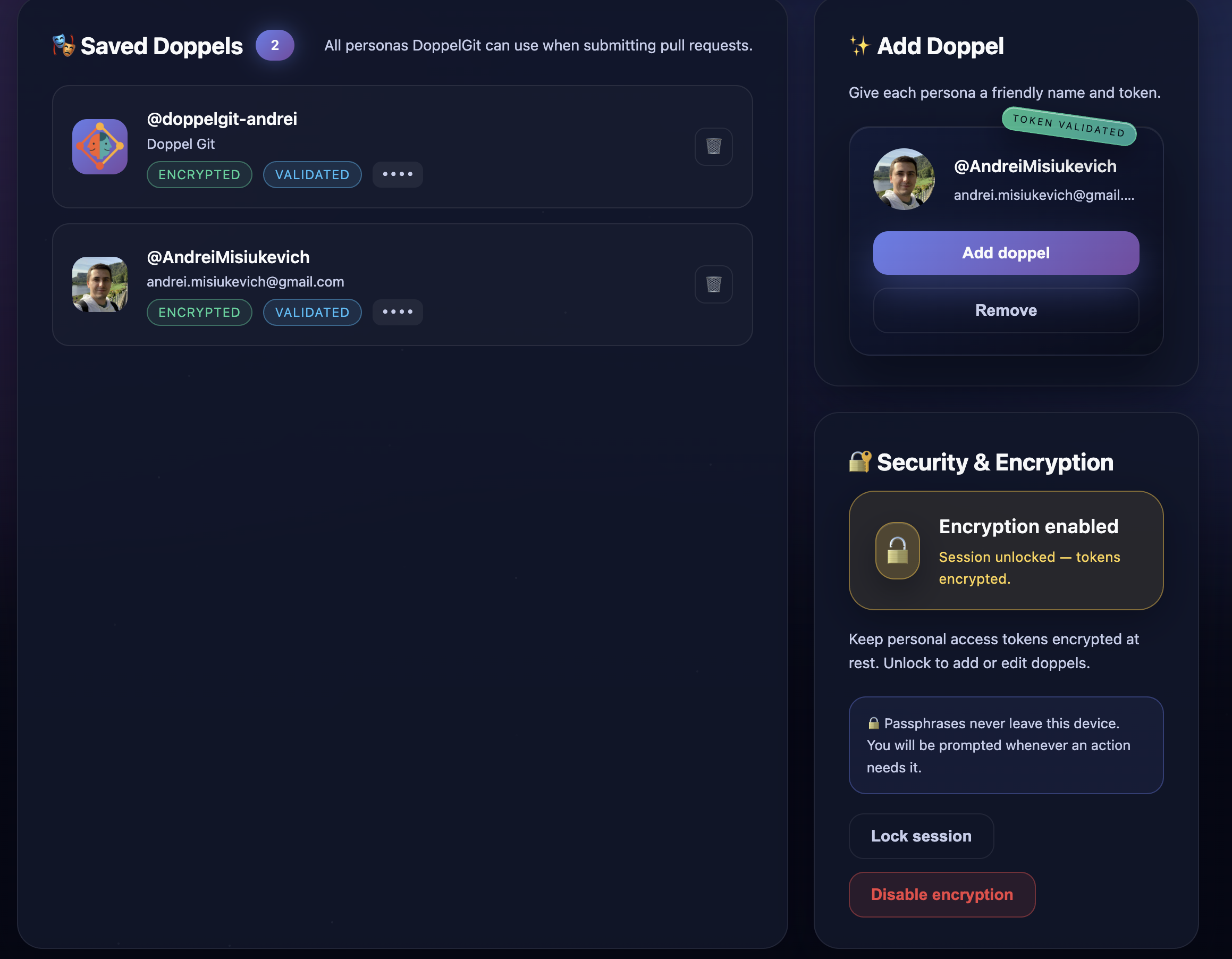
- Click the DoppelGit icon in Chrome → "Options" (or right-click → Options)
- In the "Add Doppel" section, paste your GitHub PAT
- Click "Validate token"
- DoppelGit will fetch the GitHub profile associated with the token
- Verify it's the correct account, then click "Add doppel"
Your doppel now appears in the "Saved Doppels" list. Repeat this process to add more doppels.
Submit a PR as a Doppel
- Navigate to any GitHub repository where your doppel has access
- Go to the Pull Request creation page (e.g.,
/compare/feature-branch) - Fill in the PR title and description as usual
- Below GitHub's native button, you'll see the DoppelGit controls:
- A dropdown to select which doppel to use
- A "Submit PR (DoppelGit)" button
- Select your desired doppel from the dropdown
- Click "Submit PR (DoppelGit)"
- Done! You'll be redirected to the newly created PR
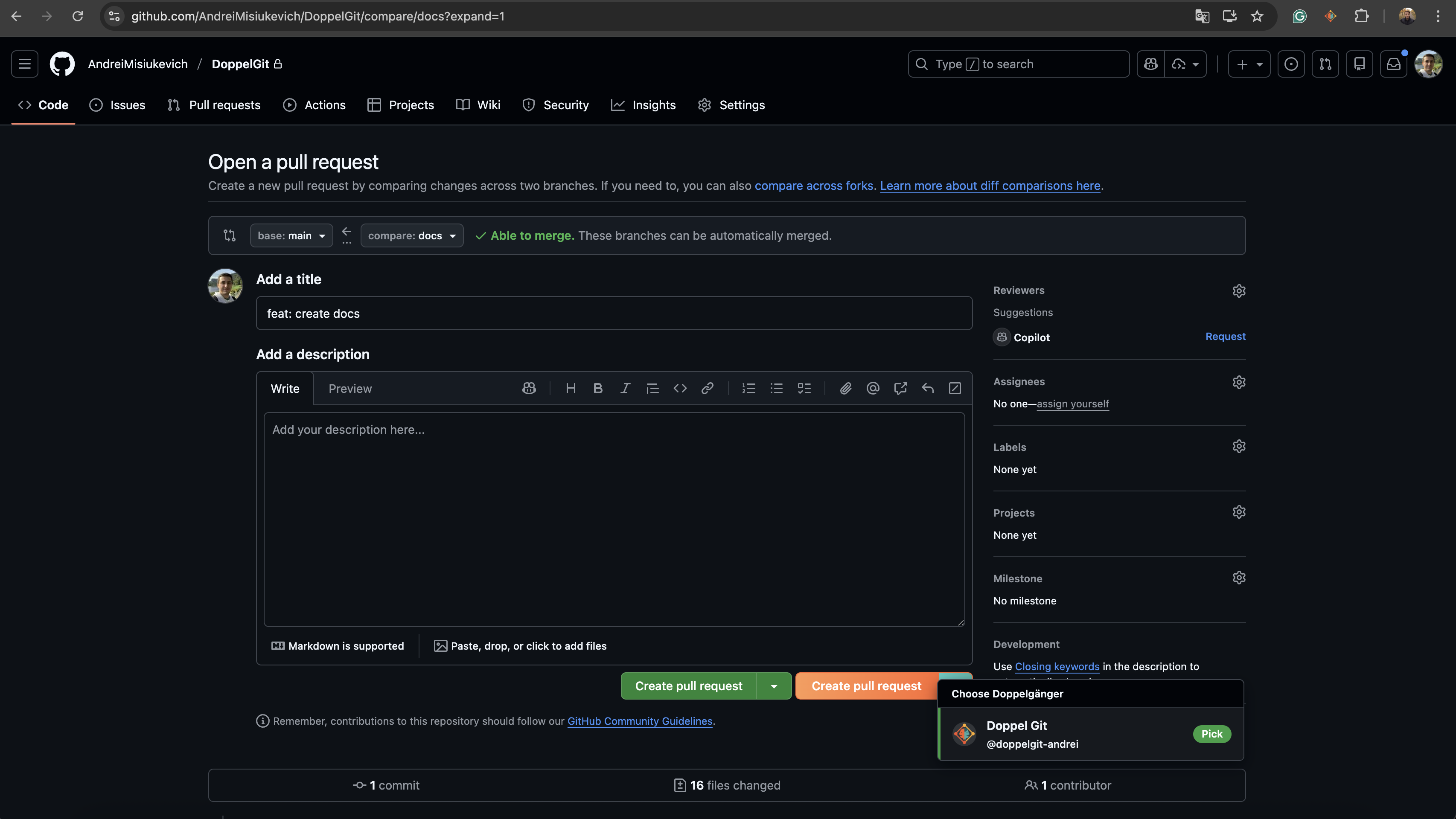
Select "Submit as current GitHub user" to use GitHub's native behavior. DoppelGit won't interfere.
Enable Encryption (Optional but Recommended)
For added security, you can encrypt your stored PATs with a passphrase:
- Open the DoppelGit options page
- Find the "Security & Encryption" card
- Click "Enable encryption"
- Enter a strong passphrase (and confirm it)
- Your existing tokens will be encrypted
From now on, DoppelGit will prompt you to unlock with your passphrase when needed. Sessions stay unlocked for 15 minutes per tab.
If you lose your passphrase, you'll need to remove your doppels and re-add them with new PATs. DoppelGit cannot recover encrypted tokens without the passphrase.
Use the Free Plan
DoppelGit includes a Free plan to get started quickly:
- Open the DoppelGit options page
- In the "DoppelGit Access" card, stay on the Free plan or upgrade to Pro
- Free includes 1 doppel and up to 10 actions/day. No card required.
Upgrade to DoppelGit Pro ($4.99/month or $49/year) for unlimited doppels, unlimited actions, and encryption.
🔧 Troubleshooting
The DoppelGit UI doesn't appear on GitHub
Make sure you're on a PR creation page (/compare/... or /pull/new/...). If you have no doppels configured, the UI won't inject. Add at least one doppel in the options page.
Token validation fails
Check that your PAT has the required permissions (Pull requests: Read/Write, Contents: Read). Also ensure the token hasn't expired and is for the correct GitHub account.
"DoppelGit is locked" message
This means your Free limits were hit or your subscription is inactive. Open the options page to upgrade to Pro or log in if you already have a paid account.
Forgot my encryption passphrase
Unfortunately, DoppelGit cannot recover encrypted tokens without the passphrase. You'll need to remove the encrypted doppels and re-add them with new PATs from GitHub.
Unexpected unlock prompts
DoppelGit caches your passphrase for 15 minutes per tab. If you switch tabs or the session times out, you'll be prompted again. You can also manually lock the session from the options page.
PR creation fails with API error
Common causes:
- The doppel's PAT doesn't have access to the target repository
- Branch protection rules prevent the operation
- The head branch doesn't exist or has no commits ahead of base
Check the error message for details from GitHub's API.
Still stuck? Open an issue on GitHub and we'll help you out.